
🐍 初心者歓迎!月額4,000円で質問し放題のPython講座
(1時間4,000円の伴走型ビデオチャット指導も受付中!)
(1時間4,000円の伴走型ビデオチャット指導も受付中!)
◯こちらのサンプルコードは指導等にご自由にお使いください。
【サンプルコードの使い方】
◯サンプルコードを写す時はコピペをしないようにしましょう。
◯▶を押すと出力が表示されます。
◯Geminiボタンを押すとGemini(AI)による解説が表示されます。間違っていることもあるので、疑問に思った場合はご質問ください。
◯本マークを押すとカテゴリーの解説が見られます。
◯サンプルコードを写す時はコピペをしないようにしましょう。
◯▶を押すと出力が表示されます。
◯Geminiボタンを押すとGemini(AI)による解説が表示されます。間違っていることもあるので、疑問に思った場合はご質問ください。
◯本マークを押すとカテゴリーの解説が見られます。
【カテゴリーごとのページへ移動】
【Code List】
すべて見る
- CODE: 0-1 (if文)
- CODE: 0-2 (if文)
- CODE: 0-3 (if文)
- CODE: 0-4 (if文)
- CODE: 1-1 (for文)
- CODE: 1-2 (for文)
- CODE: 1-3 (for文)
- CODE: 1-4 (for文)
- CODE: 1-5 (for文)
- CODE: 1-6 (for文)
- CODE: 2-1 (関数)
- CODE: 2-2 (関数)
- CODE: 2-3 (関数)
- CODE: 2-4 (関数)
- CODE: 2-5 (関数)
- CODE: 2-6 (関数)
- CODE: 3-1 (配列)
- CODE: 3-2 (配列)
- CODE: 3-3 (配列)
- CODE: 3-4 (配列)
- CODE: 3-5 (配列)
- CODE: 3-6 (配列)
- CODE: 4-1 (配列)
- CODE: 4-2 (配列)
- CODE: 4-3 (配列)
- CODE: 5-1 (メイン関数)
- CODE: 5-2 (メイン関数)
- CODE: 5-3 (メイン関数)
- CODE: 5-4 (メイン関数)
- CODE: 5-5 (メイン関数)
- CODE: 5-6 (メイン関数)
- CODE: 5-7 (メイン関数)
- CODE: 5-8 (メイン関数)
- CODE: 5-9 (メイン関数)
- CODE: 6-1 (openpyxl)
- CODE: 6-2 (openpyxl)
- CODE: 6-3 (openpyxl)
- CODE: 7-1 (文字列)
- CODE: 7-2 (文字列)
- CODE: 7-3 (文字列)
- CODE: 7-4 (正規表現)
- CODE: 7-5 (正規表現)
- CODE: 7-6 (正規表現)
- CODE: 8-1 (ファイル入出力)
- CODE: 8-2 (ファイル入出力)
- CODE: 9-1 (ファイル入出力)
- CODE: 9-2 (ファイル入出力)
- CODE: a-1 (Numpy)
- CODE: a-2 (Numpy)
- CODE: a-3 (Matplotlib)
- CODE: a-4 (Matplotlib)
- CODE: b-1 (Pandas)
- CODE: b-2 (Pandas)
- CODE: b-3 (Pandas)
- CODE: b-4 (Pandas)
- CODE: c-1 (Biopython)
- CODE: c-2 (Biopython)
- CODE: c-3 (Biopython)
- CODE: d-1 (scikit-learn)
- CODE: d-2 (scikit-learn)
- CODE: d-3 (scikit-learn)
- CODE: e-1 (seaborn)
- CODE: e-2 (Graphviz)
- CODE: f-1 (Gemini)
- CODE: f-2 (Gemini)
- CODE: f-3 (Gemini)
- CODE: g-1 (Tkinter)
- CODE: g-2 (Tkinter)
- CODE: g-3 (Tkinter)
- CODE: g-4 (Tkinter)
- CODE: h-1 (スクレイピング)
- CODE: h-2 (スクレイピング)
- CODE: h-3 (スクレイピング)
- CODE: i-1 (API)
- CODE: i-2 (API)
- CODE: j-1 (クラス)
- CODE: j-2 (クラス)
- CODE: k-1 (ソケット通信)
- CODE: k-2 (ソケット通信)
- CODE: k-3 (ソケット通信)
- CODE: k-4 (ソケット通信)
- CODE: m-1 (Pytorch)
- CODE: m-2 (Pytorch)
- CODE: m-3 (Pytorch)
- CODE: n-1 (MediaPipe)
- CODE: p-1 (Flask)
- CODE: q-1 (OpenCV)
- CODE: r-1 (Streamlit)
- CODE: r-2 (Streamlit)
- CODE: r-3 (Streamlit)
- CODE: r-4 (Streamlit)
- CODE: r-5 (Streamlit)
- CODE: s-1 (辞書)
- CODE: s-2 (辞書)
CODE: 0-1 (if文)
wake_up_time = 12

if ( wake_up_time==7 ):
    print("朝ごはんを食べる")
elif ( wake_up_time==12 ):
    print("昼ごはんを食べる")
else:
    print("何も食べない")


- elifで、「上のifの条件に当てはまらなかった時」という意味になる。
- elseは、「上の全てのifとelifの条件に当てはまらなかった時」という意味になる。
- ifに()をつけているが、つけなくてもOK。(つけないほうが主流だが、わかりやすさの重視のためにつけています。)
- 参考サイト1

CODE: 0-2 (if文)
wake_up_time = 7

is_hungry = True

if ( wake_up_time==7 ):
    if ( is_hungry==True ):
        print("朝ごはんを食べる")
    else:
        print("朝ごはんを食べない")
else:
    print("何も食べない")
- インデント(字下げ)が重要!! インデントでどこまでがそのifの中身かを判断する。
- 今回のようにifが入れ子構造になっているとわかりづらいが、一つずつ分解して考えていこう。
CODE: 0-3 (if文)
wake_up_time = 8
if ( wake_up_time == 7 ):
    print("たべる")
    print("おなかいっぱい")
CODE: 0-4 (if文)
wake_up_time = 8
if ( wake_up_time == 7 ):
    print("たべる")
print("おなかいっぱい")
CODE: 1-1 (for文)
for i in range(0, 3):
    print(i)
- for文はrange()と組み合わせることが多いが、 for i in range(0, 10):としたときのiの範囲は 「0〜10」ではなく 「0〜9」 であることに注意!!
- forの後はインデントされている部分だけループが行われる。
- 参考サイト1
CODE: 1-2 (for文)
a = 3
for i in range(0, 10):
    a += 4
print(a)
- forの後はインデントされている部分だけループが行われる。
- +=という演算子は、左辺に右辺を足すという処理を表す。 a += 4 は a = a + 4 と同じ。
CODE: 1-3 (for文)
s = 0
for i in range(3, 12):
    s += i
print(s)
CODE: 1-4 (for文)
for i in range(0, 5):
    print(i)
    print("Hello!")
CODE: 1-5 (for文)
s = 0

for i in range(0, 5):
    s += i * 2

print(s)
CODE: 1-6 (for文)
a = 1

for i in range(1, 6):
    a = a * i

print(a)
CODE: 2-1 (関数)
def print_name(name):
    print("私の名前は" + name + "です。")
    return

print_name("田中太郎")
- defで関数定義ができる。
- この関数は何もreturnしない関数。
- +で文字列の連結ができる。
- 参考サイト1
CODE: 2-2 (関数)
def calc_mean(a, b, c):
    m = (a + b + c) / 3
    return(m)


m = calc_mean(3, 6, 9)
print(m)
- 関数は「何を入れて(引数)」「何が出てくるか(返り値)」が重要!!
- calc_mean()は、3つの数字を入れたら、その平均が出てくる関数。
- 今回のcalc_mean()の中にあるmは、calc_mean()の中だけで通用する変数。外にあるmとは「関係が無い」。
CODE: 2-3 (関数)
def print_hello():
    print("hello!")
    return


print_hello()
- このように、引数も返り値もない関数もあるが、特殊な場合を除いてあまり使われることはない。
CODE: 2-4 (関数)
def calc3(x, y, z):
    a = (x * y * z) / 3
    return(a)

for i in range(0, 4):
    x = calc3(i, 3, 6)
    print(x)
- 関数は「何を入れて(引数)」「何が出てくるか(返り値)」を考えるのが大事!!
- 今回のcalc3()はx, y, zを入れると、それぞれの値の積を3で割った値が出てくる。
CODE: 2-5 (関数)
def calc3(x, y, z):
    a = (x * y * z) / 3
    return(a)

x = 0
for i in range(0, 4):
    x += calc3(i, 3, 6)

print(x)
- x += aでxにaを加算する意味となる。
CODE: 2-6 (関数)
def calc3(x, y, z):
    a = (x * y * z) / 3
    return(a)

x = 0
for i in range(0, 5):
    x += calc3(i, 3, 6)

if ( x<100 ):
    print("OK")
else:
    print("NG")
CODE: 3-1 (配列)
a = [3, 4, 9, 2]
print(a[0])
print(a[3])
- a[n]で、配列のn番目の要素にアクセスすることができる。
- 配列のインデックスは0はじまりなことに注意!!
- 参考サイト1
CODE: 3-2 (配列)
a = [3, 5, 9, 0]
a[2] = 4
print(a)
- a[n] = xとすることで、n番目の要素をxに書き換えることができる。
- print(配列)で配列全体を出力し、確認できる。
CODE: 3-3 (配列)
a = []
a.append(4)
a.append(2)
a.append(8)
a.pop(2)

print(a)
- a = []で空の配列を作成できる。これがないと後のappend()やpop()は使えない。
- append()で配列に要素を追加できる。(頻出!!)
- pop(n)で配列のn番目の要素を削除する。nという要素を探して削除するのではなく、nはインデックスであることに注意!!
CODE: 3-4 (配列)
def calc3(x, y, z):
    a = (x * y * z) / 3
    return(a)

a = [3, 5, 9, 10]
x = 0
for i in range(0, 4):
    b = a[i]
    x += calc3(b, 3, 6)

print(x)
- 配列とfor文の組み合わせは頻出!!
- for n in a:のように、配列をそのままfor文に入れることもできる。わかりやすい方で書けばOK。
- 今回のようにiを変化させてa[i]として配列の要素を取り出す方法は、後からデバッグがしやすいという利点がある。
CODE: 3-5 (配列)
def calc_tax(a):
    r = 1.1
    x = a * r
    return(x)

goods = [1000, 2000, 3000]
total = 0

for i in range(0, len(goods)):
    total += goods[i]

total = calc_tax(total)
print(int(total))
- calc_tax()は「商品の値段を入れて」「消費税込みの値段が返ってくる」関数。
- 関数が出てきたら「何を入れて」「何が出てくるか」を考えよう!!
CODE: 3-6 (配列)
def calc_tax(a):
    r = 1.1
    x = a * r
    return(x)

goods = []
goods.append(1000)
goods.append(2000)
goods.append(3000)
goods.append(4000)
total = 0

for i in range(0, len(goods)):
    total += calc_tax(goods[i])

print(int(total))
- append()は便利で非常によく使われるのでチェック!!
- goods = []で空の配列を作成できる。これがないとappend()が使えないので注意。
CODE: 4-1 (配列)
def calc_pow(x, n):
    y = 1
    for i in range(0, n):
        y = y * x
    return(y)


x = 4
n = 3
y = calc_pow(x, n)

print(y)
CODE: 4-2 (配列)
def calc_pow(x, n):
    y = 1
    for i in range(0, n):
        y = y * x
    return(y)


x = 2
n = 5
y = calc_pow(x, n)

if ( y<40 ):
    print("OK")
else:
    print("NG")
CODE: 4-3 (配列)
def calc_pow(x, n):
    y = 1
    for i in range(0, n):
        y = y * x
    return(y)

x = 2
list0 = []

for i in range(0, 4):
    y = calc_pow(x, i)
    list0.append(y)

s = sum(list0)
print(s)
CODE: 5-1 (メイン関数)
def inch2cm(inch):
    cm = inch*2.54
    return(cm)


def main():
    inch = 15
    cm = inch2cm(inch)
    print(cm)
    return(0)

main()
CODE: 5-2 (メイン関数)
def inch2cm(inch):
    cm = inch*2.54
    return(cm)


def feet2cm(feet):
    cm = feet*30.48
    return(cm)


def main():
    inch = 15
    feet = 3
    cm = inch2cm(inch) + feet2cm(feet)
    print(cm)
    return(0)

main()
CODE: 5-3 (メイン関数)
def inch2cm(inch):
    cm = inch*2.54
    return(cm)


def feet2cm(feet):
    cm = feet*30.48
    return(cm)


def main():
    inch = 10
    feet = 2
    cm = inch2cm(inch) + feet2cm(feet)

    if ( cm>90 ):
        print("OK")
    else:
        print("NG")
    return(0)

main()
CODE: 5-4 (メイン関数)
def calc_second(day, hour, minute):
    sec = day * 24 * 60 * 60 + hour * 60 * 60 + minute * 60
    return(sec)


def main():
    day = 3
    hour = 5
    minute = 15
    sec = 38
    result_sec = calc_second(day, hour, minute) + sec
    print(f"{day}日{hour}時間{minute}分{sec}秒 => {result_sec}秒")
    return(0)


main()
CODE: 5-5 (メイン関数)
def calc_loan_month(loan, year_rate, month_pay):
    year_rate = 1 + year_rate/100
    month = 0

    while ( 1 ):
        month += 1
        if ( month%12==0 ):
            loan *= year_rate
        loan -= month_pay
        if ( loan<=0 ):
            break
        if ( month>10000 ):     # 無限ループを防ぐ
            break

    return(month)


def main():
    loan = 13200000     # 借入金額 (円)
    year_rate = 2            # 年利 (%)
    month_pay = 120000  # 月々の支払 (円)

    month = calc_loan_month(loan, year_rate, month_pay)
    print(f"借入金額: {loan} 円")
    print(f"金利: {year_rate} %")
    print(f"月々の支払: {month_pay} 円")
    print(f"返済期間: {month} 月")

    return(0)


main()
CODE: 5-6 (メイン関数)
def calc_monthly_interest_rate(annual_interest_rate):
    return(annual_interest_rate / 12)


def calc_total_months(years):
    return(years * 12)


def simulate_savings(annual_interest_rate, years, monthly_deposit):
    monthly_interest_rate = calc_monthly_interest_rate(annual_interest_rate)
    total_months = calc_total_months(years)

    total_amount = 0.0
    total_principal = 0.0
    total_interest = 0.0

    for month in range(1, total_months + 1):
        total_amount += monthly_deposit
        total_principal += monthly_deposit

        current_month_interest = total_amount * monthly_interest_rate
        total_amount += current_month_interest
        total_interest += current_month_interest

        if ( month % 12 == 0 ):
            current_year = month // 12

    return(total_interest)


def main():
    monthly_deposit = 20000
    years = 20
    annual_interest_rate = 0.03


    final_interest = simulate_savings(annual_interest_rate, years, monthly_deposit)

    final_interest = int(final_interest)

    print(f"月々の積立額:    {monthly_deposit}円")
    print(f"積立年:          {years}年")
    print(f"年利:            {annual_interest_rate}%")
    print(f"最終運用益:      {final_interest}円")
    return(0)


main()
CODE: 5-7 (メイン関数)
def calculate_epicenter_distance(s_p_time_diff, vp, vs):
    """
    大森公式を使って、P波とS波の到達時間差から震源地までの距離を計算する。
    """

    if ( s_p_time_diff < 0 ):
        return(-1)

    if ( vp <= vs ):
        return(-1)
    if ( vs <= 0 ):
        return(-1)

    k = (vp * vs) / (vp - vs)
    distance = k * s_p_time_diff

    return(distance)


def main():
    # 例: S-P時間が5秒で、異なるP波/S波速度を指定
    sp_time = 5.0
    vp = 8.0
    vs = 4.5

    distance = calculate_epicenter_distance(sp_time, vp, vs)
    if ( distance>=0 ):
        print("S-P時間: %.2f秒 (Vp=%.2f, Vs=%.2f) の場合、震源地までの距離は %.2f km です。" % (sp_time, vp, vs, distance))
    else:
        print("Error")

    return(0)


main()
- sprintfスタイルの場合、%.2fとすることで、小数第二桁まで出力することができる。
- 参考サイト1
CODE: 5-8 (メイン関数)
def vertex_form(a, b, c):
    """
    y = ax^2 + bx + c を平方完成する
    """
    p = -b / (2*a)
    q = c - (b**2) / (4*a)
    return(p, q)


def main():
    a = 2
    b = 5
    c = 3
    (p, q) = vertex_form(2, 5, 3)
    print(f"y = {a}(x - {p})^2 + {q}")

    return(0)


main()
CODE: 5-9 (メイン関数)
import random

def estimate_pi(num_samples):
    """
    モンテカルロ法による円周率の推定
    """

    inside_circle = 0

    for i in range(num_samples):
        x = random.uniform(0, 1)
        y = random.uniform(0, 1)

        if ( x**2 + y**2 <= 1 ):
            inside_circle += 1

    pi_estimate = 4 * inside_circle / num_samples
    return(pi_estimate)


def main():
    pi = estimate_pi(100000)
    print(pi)

    return(0)


main()
CODE: 6-1 (openpyxl)
import openpyxl as px

OUTPUT_FILE = "6-1_test.xlsx"

def main():
    wb = px.Workbook()
    ws = wb.active

    ws.cell(column=1, row=1).value = 3
    ws.cell(column=2, row=1).value = 5
    ws.cell(column=1, row=2).value = 9
    ws.cell(column=2, row=2).value = 2

    wb.save(OUTPUT_FILE)

main()
CODE: 6-2 (openpyxl)
import openpyxl as px

OUTPUT_FILE = "6-2_test.xlsx"

def main():
    wb = px.Workbook()
    ws = wb.active

    for i in range(1, 10):
        for j in range(1, 10):
            ws.cell(column=i, row=j).value = i * j

    wb.save(OUTPUT_FILE)


main()
CODE: 6-3 (openpyxl)
import openpyxl as px

INPUT_FILE = "6-2_test.xlsx"

def main():
    wb = px.load_workbook(INPUT_FILE)
    ws = wb.active

    cell25 = ws.cell(column=2, row=5).value
    print(cell25)

    cell38 = ws.cell(column=3, row=8).value
    print(cell38)

    return(0)


main()
- エクセルファイルの読み込みはpx.load_workbook(ファイル名)とする。
CODE: 7-1 (文字列)
def print_myinfo(first, last, age):
    print("私の名前は%s%sです。" % (first, last))
    print("私の年齢は%d歳です。" % (age))
    return

firstname = "山田"
lastname = "太郎"
age = 39

print_myinfo(firstname, lastname, age)
- この%記法(sprintfスタイル)の他にもf文字列やformat()メソッドがある。 文字列は%s, 整数は%dだけは覚えておこう。
- 参考サイト1
CODE: 7-2 (文字列)
for i in range(0, 4):
    print("%04d.jpg" % (i))
- %04dとすることで、強制的に0埋めの4桁の整数を出力させることができる。
CODE: 7-3 (文字列)
def jpg2png(jpgname):
    if ( not(".jpg" in jpgname) ):
        print("Error: 拡張子が.jpgではありません")
        return("")
    else:
        pngname = jpgname.replace(".jpg", ".png")
        return(pngname)

fname = "sample.jpg"
pngname = jpg2png(fname)
print(pngname)
- "in"を使うことで、特定の文字列が含まれているかどうかを確かめることができる。
- 文字列の関数(メソッド)の中でもreplace()は頻出!
CODE: 7-4 (正規表現)
import re

def main():
    text = "名前:山田太郎、年齢:30歳、職業:エンジニア"
    pattern = r'名前:(.*)、年齢:(.*)歳、職業:(.*)'

    dates = re.findall(pattern, text)
    for name, age, job in dates:
        print("%s, %s, %s" % (name, age, job))
    return(0)


main()
- reモジュールにはいろいろな関数があるが、まずはre.findall()を押さえておけばOK。
- 基本は()でくくって、そこの中に正規表現を入れる。
- 特に(.*)は頻出! これで数値/文字列関係なくマッチさせることができる。
- 参考サイト1 参考サイト2
CODE: 7-5 (正規表現)
import re

def main():
    text = "イベントは2023年5月15日から2023年5月17日まで開催されます。"
    pattern = r'(\d{4})年(\d{1,2})月(\d{1,2})日'

    dates = re.findall(pattern, text)
    for year, month, day in dates:
        print("%04d/%02d/%02d" % (int(year), int(month), int(day)))
    return(0)


main()
- 数値4桁のマッチは\d{4}, 数値1or2桁のマッチは\d{1,2}で表現できる。
CODE: 7-6 (正規表現)
import re

def main():
    text = "イベントは2023年5月15日から2023年5月17日まで開催されます。"
    pattern = r'(\d{4})年'

    text_sub = re.sub(pattern, "2025年", text)
    print(text_sub)
    return(0)


main()
CODE: 8-1 (ファイル入出力)
# ---- Config ----

FILE_NAME = "8-1_output.txt"


def main():
    s = "40 92 20 44 91"

    fname = FILE_NAME
    f = open(fname, mode="w")
    f.write(s)
    f.close()

    return(0)


main()
CODE: 8-2 (ファイル入出力)
# ---- Config ----

FILE_NAME = "8-1_output.txt"


def main():
    fname = FILE_NAME
    f = open(fname, mode="r")
    s = f.read()
    f.close()
    s_list = s.split(" ")
    print(s_list)

    return(0)


main()
CODE: 9-1 (ファイル入出力)
import random

# ---- Config ----

FILE_NAME = "9-1_output.txt"
ROWS = 3
COLUMNS = 5


def make_rand_table(rows, cols):
    datalist = []
    for i in range(0, rows):
        d = []
        for j in range(0, cols):
            d.append(str(random.randint(1, 100)))
        datalist.append(d)

    return(datalist)


def write_file(datalist, fname):

    table_str = ""

    rows = len(datalist)
    for i in range(0, rows):
        table_str += " ".join(datalist[i]) + "\n"

    f = open(fname, mode="w")
    f.write(table_str)
    f.close()

    return(0)


def main():
    rows = ROWS
    cols = COLUMNS
    datalist = make_rand_table(rows, cols)
    print(datalist)

    fname = FILE_NAME
    write_file(datalist, fname)

    return(0)


main()
CODE: 9-2 (ファイル入出力)
# ---- Config ----

FILE_NAME = "9-1_output.txt"


def read_file(fname):
    f  = open(fname, mode="r")
    table_str = f.read()
    f.close()

    datalist = []

    lines = table_str.split("\n")
    rows = len(lines)
    for i in range(0, rows):
        if ( lines[i]=="" ):
            continue
        d = lines[i].split(" ")
        datalist.append(d)

    return(datalist)


def main():
    fname = FILE_NAME

    datalist = read_file(fname)
    print(datalist)

    return(0)


main()
CODE: a-1 (Numpy)
import numpy as np


def main():
    a_arr = np.array([4, 6, 3, 1, 9])
    print(a_arr)
    print(a_arr.ndim)   # 次元
    print(a_arr.shape)  # 大きさ

    b_arr = np.zeros((4, 3))    # 4行3列の行列を作成(0埋め)
    print(b_arr)
    print(b_arr.ndim)   # 次元
    print(b_arr.shape)  # 大きさ

    c_arr = np.zeros((5, 8))    # 5行8列の行列を作成(0埋め)
    print(c_arr)
    print(c_arr.ndim)   # 次元
    print(c_arr.shape)  # 大きさ

    return(0)


main()
- pip install numpyなどでライブラリのインストールが必要。
- numpyはいろいろな処理ができるが、まずはnumpy arrayが扱えればOK!!
- numpy arrayは通常の配列からパワーアップしたものだと考えればよい。特に二次元配列(行列)を得意としている。
- np.zeros((m, n))でm行n列の0埋めの行列を作成できる。(頻出!!)
- 参考サイト1
CODE: a-2 (Numpy)
import numpy as np


def main():
    arr = np.array([4, 3, 5, 2, 9])
    print(np.min(arr))      # 最小値
    print(np.max(arr))      # 最大値
    print(np.mean(arr))     # 平均値
    print(np.std(arr))      # 標準偏差
    print(np.var(arr))      # 分散
    print(np.sum(arr))      # 合計値
    print(np.sort(arr))     # 並び替え

    # 九九の表を作成
    arr99 = np.zeros((9, 9))
    for i in range(0, 9):
        for j in range(0, 9):
            arr99[i][j] = (i+1) * (j+1)

    print(arr99)

    return(0)


main()
- numpyを使うと、各種計算が簡単にできる。
- 二次元配列(行列)の値を参照する時は、arr99[行][列]のように記述する。
CODE: a-3 (Matplotlib)
import numpy as np
import matplotlib.pyplot as plt


# ---- Config ----

FILE_NAME = "a-3_output.png"


def main():
    fname = FILE_NAME

    x_arr = np.linspace(0, 10, 1000)
    y_arr = np.sin(x_arr)

    plt.plot(x_arr, y_arr)
    plt.savefig(fname)

    return(0)


main()
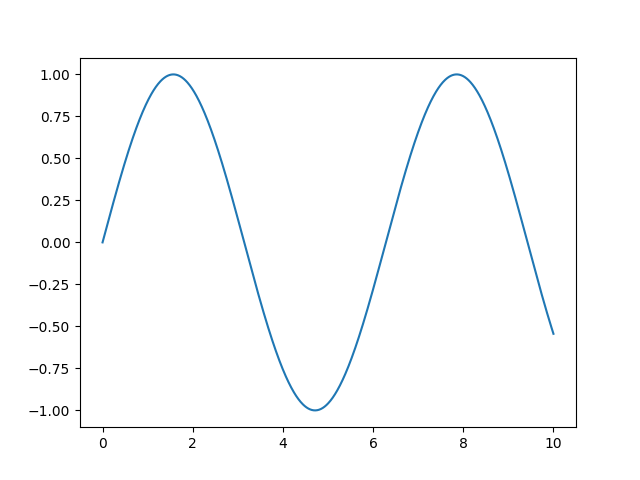
CODE: a-4 (Matplotlib)
import numpy as np
import matplotlib.pyplot as plt


# ---- Config ----

FILE_NAME = "a-4_output.png"


# y = ax^3 + bx^2 + cx + d
def cubic_equation(a, b, c, d, x):
    y = a * x**3 + b * x**2 + c * x + d
    return(y)


def main():
    a = 1
    b = -5
    c = -2
    d = 5
    fname = FILE_NAME

    x_arr = np.linspace(-10, 10, 1000)
    y_arr = cubic_equation(a, b, c, d, x_arr)

    plt.plot(x_arr, y_arr)
    plt.savefig(fname)

    return(0)


main()
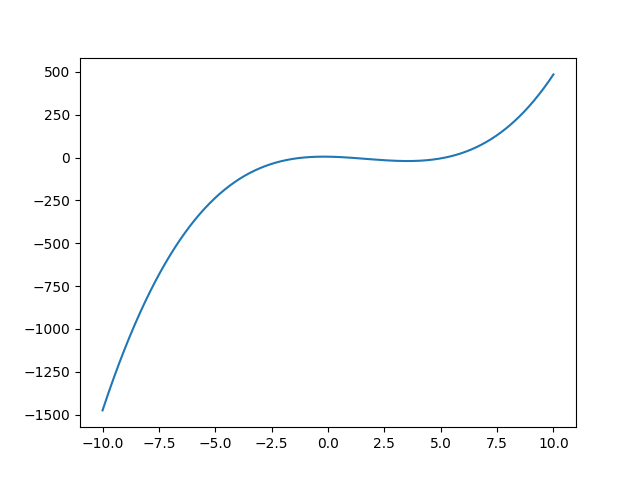
- a-3のsin()とは異なり、今回は自作の関数(三次関数)を使用。
- a_4-output.pngというファイルが作成されるのでチェック!!
- 生成ファイル1
CODE: b-1 (Pandas)
import pandas as pd


# ---- Config ----

FILE_NAME = "http://python.hisakatano.com/data/weight1.xlsx"


def main():
    fname = FILE_NAME
    df = pd.read_excel(fname, index_col=0, header=0)
    print("読み込んだデータ:")
    print(df)
    print()

    # "一日目"の列を抜き出す
    col1 = df[1]
    print("一日目の列:")
    print(col1)
    print()

    # "体重[kg]"の行を抜き出す
    weight_row = df[0:1]
    print("体重[kg]の行:")
    print(weight_row)
    print()

    # numpy arrayへ変換
    weight_arr = weight_row.to_numpy()
    print("numpy arrayへ変換された体重[kg]の行:")
    print(weight_arr)
    return(0)


main()
CODE: b-2 (Pandas)
import pandas as pd
import matplotlib.pyplot as plt


# ---- Config ----

FILE_NAME = "http://python.hisakatano.com/data/weight1.xlsx"
OUTPUT_FILE = "output_b-2.png"


def main():
    fname = FILE_NAME
    df = pd.read_excel(fname, index_col=0, header=0)

    # headerを抜き出す
    header = df.columns
    header_arr = header.to_numpy()
    print("header:")
    print(header_arr)
    print()


    # "歩数"の行を抜き出す
    hosu_row = df[1:2]
    print("歩数の行:")
    hosu_arr = hosu_row.to_numpy()[0]
    print(hosu_arr)

    output_file = OUTPUT_FILE
    plt.plot(header_arr, hosu_arr)
    plt.savefig(output_file)

    return(0)


main()
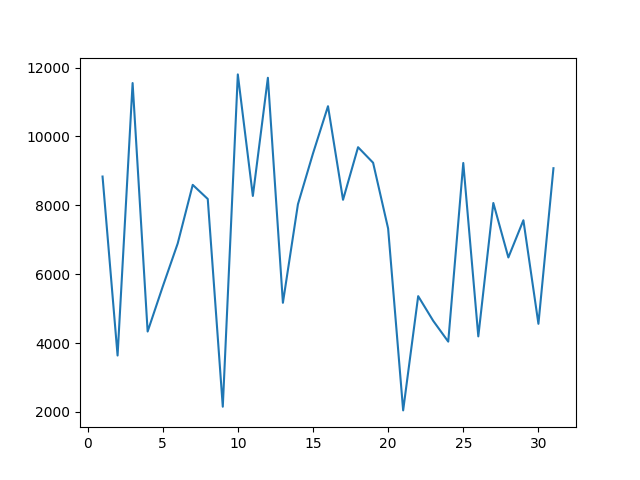
- 行をnumpyに変換するときに行が一つであっても二次元配列になるためto_numpy()[0]とする。
- output_b-2.pngが出力されるので要確認!
- 生成ファイル1
CODE: b-3 (Pandas)
import pandas as pd
import numpy as np


# ---- Config ----

FILE_NAME = "https://python.hisakatano.com/data/exams.csv"


def main():
    fname = FILE_NAME
    df = pd.read_csv(fname, index_col=None, header=0, skip_blank_lines=True)

    # "math"の列を抜き出す
    math_arr = df["math"].to_numpy()
    math_arr = math_arr.astype(np.float32)

    # 平均値
    mean = np.mean(math_arr)
    print("平均値: %.1f" % (mean))

    # 中央値
    median = np.median(math_arr)
    print("中央値: %.1f" % (median))

    # 分散
    var = np.var(math_arr)
    print("分散: %.1f" % (var))

    # 標準偏差
    std = np.std(math_arr)
    print("標準偏差: %.1f" % (std))

    # 最小値
    min0 = np.min(math_arr)
    print("最小値: %.1f" % (min0))

    # 最大値
    max0 = np.max(math_arr)
    print("最大値: %.1f" % (max0))


    return(0)


main()
- 平均値、中央値、分散などはNumpyを使って簡単に求まる。
- 元データ
CODE: b-4 (Pandas)
import pandas as pd
import numpy as np


# ---- Config ----

FILE_NAME = "https://python.hisakatano.com/data/exams.csv"
OUTPUT_FILE = "b-4_output.csv"


# ---------------------------------------------------------
# 平均からの差を求める
# ---------------------------------------------------------

def calc_mean_diff(arr):
    r = arr - np.mean(arr)
    return(r)


# ---------------------------------------------------------
# 偏差値を求める
# ---------------------------------------------------------

def calc_t_score(arr):
    std = np.std(arr)
    md_arr = calc_mean_diff(arr)
    t_score_arr = (md_arr / std) * 10 + 50
    return(t_score_arr)


def main():
    fname = FILE_NAME
    df = pd.read_csv(fname, index_col=None, header=0, skip_blank_lines=True)

    # "math"の列を抜き出す
    math_arr = df["math"].to_numpy()
    math_arr = math_arr.astype(np.float32)

    # 平均からの差
    md_arr = calc_mean_diff(math_arr)

    # 偏差値
    ts_arr = calc_t_score(math_arr)

    # 出力データ
    df_out = pd.DataFrame()
    df_out["score"] = math_arr
    df_out["mean_diff"] = md_arr
    df_out["t_score"] = ts_arr
    print(df_out)

    df_out.to_csv(OUTPUT_FILE, index=False)
    return(0)


main()
- Tスコア(偏差値)はNumpyで直接求める関数がないため、自作している。
- arr - np.mean(arr) は、配列からスカラー値を引いているので数学的にはおかしいが、「ブロードキャスト」という書き方で、Numpyでは正しく実行される。
- 出力ファイル
CODE: c-1 (Biopython)
from Bio import SeqIO

# ---- Config ----

#FILE_NAME = "https://www.uniprot.org/uniprot/P59082.fasta"
FILE_NAME = "P59082.fasta"


def main():
    fname = FILE_NAME
    with open(fname, mode="r") as f:
        for record in SeqIO.parse(f, "fasta"):
            id_part = record.id
            desc_part = record.description
            seq = record.seq

            print("id: %s" % (id_part))
            print("desc: %s" % (desc_part))
            print("seq: %s" % (seq))

    return(0)


main()
CODE: c-2 (Biopython)
from Bio import SeqIO

# ---- Config ----

FILE_NAME = "P59082.fasta"


def calc_gc(seq):
    gc = (seq.count("G") + seq.count("C")) / len(seq)
    return(gc)


def main():
    fname = FILE_NAME
    with open(fname, mode="r") as f:
        for record in SeqIO.parse(f, "fasta"):
            id_part = record.id
            desc_part = record.description
            seq = record.seq
            rev_seq = seq.reverse_complement()
            gc = calc_gc(seq)

            print("id: %s" % (id_part))
            print("desc: %s" % (desc_part))
            print("Reverse complement seq: %s" % (rev_seq))
            print("GC: %s" % (gc))

    return(0)


main()
- reverse_complement()で逆相補鎖の配列を作成。
- 文字列操作の部分はBiopythonの関数に頼らなくてもOK。むしろ自分自身で書けるようになった方がよい。
- calc_gc()でGC含量を計算。
- 参考サイト1
- biopythonのドキュメント
- アップデートによって前まで使われていた関数が使えなくなっていたりするので、あまりBiopythonの関数を信用しないようにしたほうがよい。
CODE: c-3 (Biopython)
from Bio import SeqIO
import gzip

# ---- Config ----

FILE_NAME = "pdb_seqres.txt.gz"
PRINT_NUM = 5


def main():
    fname = FILE_NAME

    f = gzip.open(fname, mode="rt")

    i = 0
    for record in SeqIO.parse(f, "fasta"):
        id_part = record.id
        desc_part = record.description
        seq = record.seq

        print("id: %s" % (id_part))
        print("desc: %s" % (desc_part))
        print("seq: %s" % (seq))

        i += 1
        if ( PRINT_NUM<=i ):
            break

    f.close()

    return(0)


main()
- .gzファイルはこちらからダウンロード
- .gzファイルの読み込みは通常のopen()ではなくgzip.open()を使う。
- c-0, c-1のようにwithを使ってもいいが、インデントが深くなり可読性が悪くなることがある。今回のようにopen()/close()を使うとインデントが深くならないという利点があるが、close()を忘れないようにしないといけない。
- 今回は出力が延々と続くので、5件で切っている。
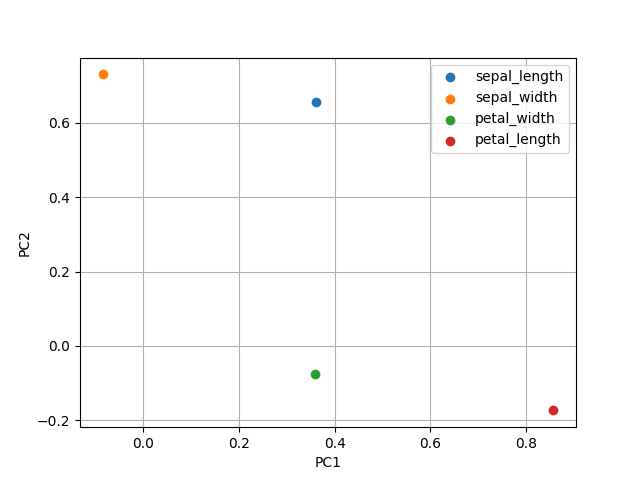
CODE: d-1 (scikit-learn)
from sklearn.decomposition import PCA
import pandas as pd
import matplotlib.pyplot as plt


# ---- Config ----

CSV_FILE = "http://python.hisakatano.com/data/iris.csv"
OUTPUT_FILE_1 = "d-1_output_1.png"
OUTPUT_FILE_2 = "d-1_output_2.png"


# ---------------------------------------------------------
# PCAの次元圧縮結果のプロット
# ---------------------------------------------------------

def plot_pca_result(df, output_file):
    plt.clf()
    label_type = set(df["label"])
    for t in label_type:
        df2 = df.query('label=="%s"' % (t))
        plt.scatter(x=df2[0], y=df2[1], label=t)
    plt.legend()
    plt.grid()
    plt.xlabel("PC1")
    plt.ylabel("PC2")
    plt.savefig(output_file)
    return


# ---------------------------------------------------------
# メイン
# ---------------------------------------------------------

def main():
    # ---- (1) data frameでのデータ取得 ----
    df = pd.read_csv(CSV_FILE, index_col=None, header=0)
    print(df)

    # ---- (2) numpyに変換しデータ成形 ----
    x = df.iloc[:, 0:4].to_numpy()

    # ---- (3) scikit-learnによる分析処理 ----
    pca = PCA(n_components=2)
    pca.fit(x)
    x0 = pca.transform(x)

    # ---- 次元圧縮結果の可視化 ----
    df2 = pd.DataFrame(x0)
    df2["label"] = df["species"]
    print(df2)
    plot_pca_result(df2, OUTPUT_FILE_1)

    # ---- 寄与度の可視化 ----
    df3 = pd.DataFrame(pca.components_.T)
    df3["label"] = df.columns[0:4]
    print(df3)
    plot_pca_result(df3, OUTPUT_FILE_2)

    return(0)


main()
- pip install scikit-leranが必要。
- 「(1)data frameでのデータ取得 -> (2)numpyに変換しデータ成形 -> (3) scikit-learnによる分析処理」 が共通する一連の流れ。
- numpy arrayへの変換は必要ないときもあるが、本格的なデータ分析のときには必須の手順となるため慣れておこう。
- 参考サイト1
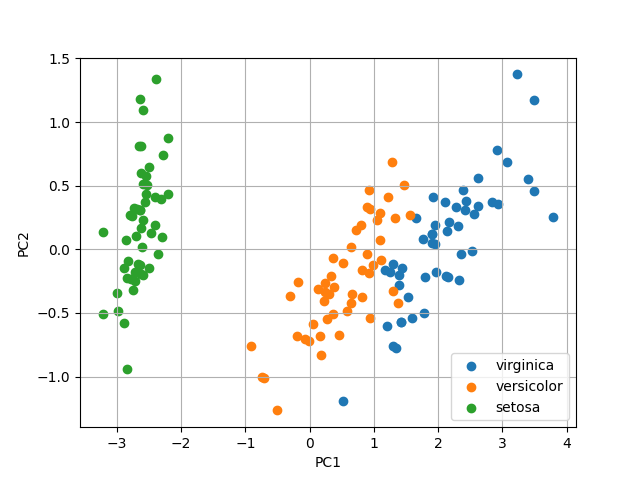
- 出力ファイル1 出力ファイル2
- irisデータについて
- PCA(主成分分析)とは?
CODE: d-2 (scikit-learn)
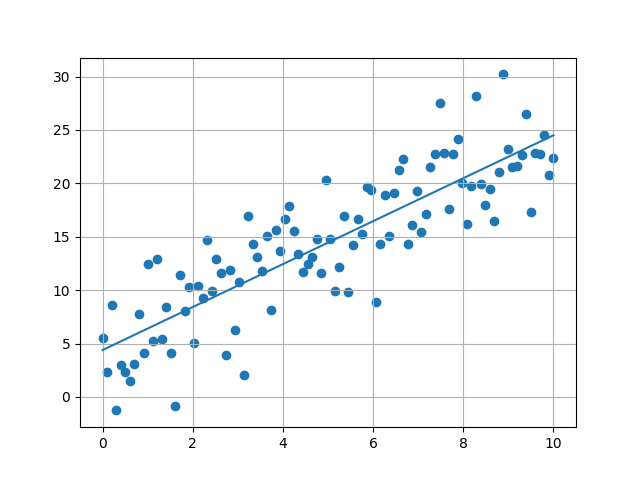
from sklearn.linear_model import LinearRegression
import pandas as pd
import matplotlib.pyplot as plt


# ---- Config ----

CSV_FILE = "http://python.hisakatano.com/data/linear_regression_data.csv"
OUTPUT_FILE = "d-2_output.png"


# ---------------------------------------------------------
# メイン処理
# ---------------------------------------------------------

def main():
    # ---- (1) data frameでのデータ取得 ----
    df = pd.read_csv(CSV_FILE, index_col=None, header=0)
    print(df)

    # ---- (2) numpyに変換しデータ成形 ----
    data_na = df.to_numpy()

    # ---- (3) scikit-learnによる分析処理 ----
    lr = LinearRegression()
    x = data_na[:, 0]
    y = data_na[:, 1]

    x = x.reshape(len(x), 1)    # xは行列にする。
                                # 今回は2次元データなのでNx1の行列。
    print(x)
    print(y)
    lr.fit(x, y)

    coef = lr.coef_[0]          # 傾き
    intercept = lr.intercept_   # 切片
    print("傾き: %f" % (coef))
    print("切片: %f" % (intercept))

    plt.scatter(x, y, color="red")
    plt.plot(x, lr.predict(x), color="blue")

    plt.grid()
    plt.savefig(OUTPUT_FILE)

    return(0)


main()
CODE: d-3 (scikit-learn)
from sklearn.model_selection import train_test_split
from sklearn.neural_network import MLPClassifier
from sklearn.preprocessing import LabelEncoder
import pandas as pd
import numpy as np
import warnings


# ---- Config ----

warnings.simplefilter("ignore")     # 警告が表示されないようにする
CSV_FILE = "http://python.hisakatano.com/data/iris.csv"


# ---------------------------------------------------------
# MLPの学習
# ---------------------------------------------------------

def learn_mlp(x_arr, y_arr):
    print("Learning ... ")
    model = MLPClassifier(hidden_layer_sizes=(100,), max_iter=100, activation="relu", verbose=True)
    model.fit(x_arr, y_arr)
    print("Learning ... done")

    return(model)


# ---------------------------------------------------------
# メイン処理
# ---------------------------------------------------------

def main():
    # ---- (1) data frameでのデータ取得 ----
    df = pd.read_csv(CSV_FILE, index_col=None, header=0)
    print(df)

    x_df = df.iloc[:, 0:4]
    y_df = df.iloc[:, 4]

    # ---- (2) numpy arrayに変換しデータ成形 ----
    x_arr = x_df.to_numpy()
    y_arr = y_df.to_numpy()

    print(x_arr[0:5])
    print(y_arr[0:5])

    # ---- (3) scikit-learnによる分析処理 ----
    # ラベルを数値に変換 ("setosa"->0, "versicolour"->1, "virginica"->2)
    le = LabelEncoder()
    y_arr = le.fit_transform(y_arr)
    print(y_arr[0:5])

    # モデルの学習
    model = learn_mlp(x_arr, y_arr)

    # スコアの確認
    # 0.9以上であればだいたいOK
    score = model.score(x_arr, y_arr)
    print("Score: %.2f" % (score))

    # モデルのテスト
    tmp_data = np.array([[7.4,2.8,6.1,1.9]])    # テストデータは行列(二次元配列)にする
    y = model.predict(tmp_data)

    for i in range(0, 4):
        print("%s: %f" % (df.columns[i], tmp_data[0][i]))
    print("の品種は")
    print(le.inverse_transform(y)[0])   # ラベルの数値を文字列に戻す

    return(0)


main()
CODE: e-1 (seaborn)
import seaborn as sns
import matplotlib
import matplotlib.pyplot as plt
import pandas as pd


# ---- Config ----

CSV_FILE = "http://python.hisakatano.com/data/iris.csv"
OUTPUT_FILE = "e-1_output.svg"
matplotlib.rcParams['font.family'] = 'DejaVu Serif'


def main():
    df = pd.read_csv(CSV_FILE, index_col=None, header=0)
    print(df)

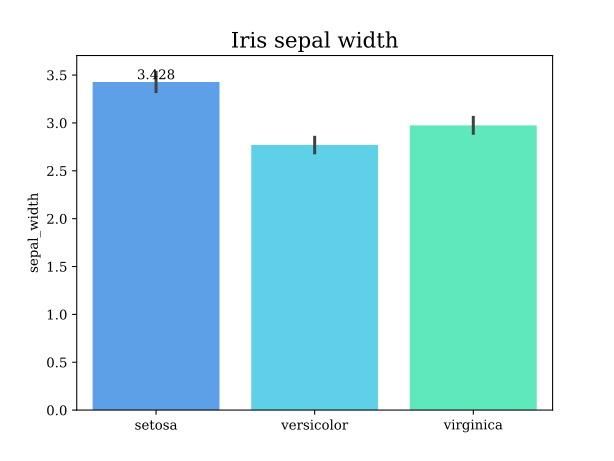
    bar_color = ["#479FFF", "#47DFFF", "#47FFC4"]

    sns.barplot(data=df, x="species", y="sepal_width", hue="species", palette=bar_color)
    plt.xlabel("")
    plt.title("Iris sepal width", fontsize=16)
    plt.savefig(OUTPUT_FILE)

    return(0)


main()
CODE: e-2 (Graphviz)
import graphviz


DOT_FILE = "e-2_input.dot"
OUTPUT_FILE = "e-2_output"


def main():
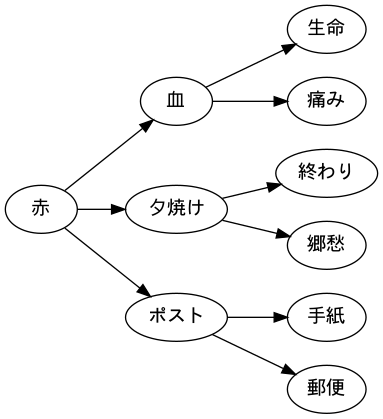
    graph = graphviz.Source.from_file(DOT_FILE, format="png")
    print(graph)
    graph.render(filename=OUTPUT_FILE, cleanup=True)

    return(0)


main()
CODE: f-1 (Gemini)
from dotenv import load_dotenv
from google import genai


GEMINI_MODEL = "gemini-2.5-flash-lite"


def main():
    load_dotenv()
    client = genai.Client()

    prompt = "博多の名物を教えて!"
    config = {
            "temperature": 0.5,
            }

    response = client.models.generate_content(model=GEMINI_MODEL, \
            contents=prompt, config=config)

    print(response.text)

    return(0)


main()
- pip install google-genai dotenv でインストール。
- GeminiのAPI KeyをGoogle公式サイトから取得しよう。
- "GEMINI_API_KEY"は環境変数で各自設定する。実行ディレクトリに.envファイルを置いておくとよい。
- envファイルってなんだ? - Qiita
- .envファイルはload_dotenv()にて読み込む。
- モデル名は実装時期によって変化するため、公式サンプルを参考にする。
- 使い方はかなり簡単なので、promptを色々変化させて試してみよう。
- "temperature"は1.0に近づくにつれ、創造的な出力をするようになっていく。ここも色々変化させて試してみよう。
CODE: f-2 (Gemini)
from dotenv import load_dotenv
from google import genai


# ---- Config ----

OUTPUT_MD = "f-2_output.md"
GEMINI_MODEL = "gemini-2.5-flash-lite"


# ---------------------------------------------------------
# MDファイルへの書き込み
# ---------------------------------------------------------

def write_md(md, mdfile):
    with open(mdfile, mode="w") as f:
        f.write(md)
    return


def main():
    load_dotenv()
    client = genai.Client()
    config = {
            "temperature": 0.2,
            }

    prompt = """
## 役割
あなたは一流の旅行雑誌ライターである。

## 任務
東京の観光地に関するレポートを作成せよ。

## 条件
- 文字数: 1,000文字程度。
- 返答などは含めず、レポートのみ書き出せ。
- 文体は敬体とする。
- マークダウン形式で出力せよ。
    """

    response = client.models.generate_content(model=GEMINI_MODEL, \
            contents=prompt, config=config)

    print(response.text)
    write_md(response.text, OUTPUT_MD)

    return(0)


main()
CODE: f-3 (Gemini)
from dotenv import load_dotenv
from google import genai
from PIL import Image


# ---- Config ----

INPUT_IMG = "f-3_input.jpg"
GEMINI_MODEL = "gemini-2.5-flash-lite"


def main():
    load_dotenv()
    client = genai.Client()
    img = Image.open(INPUT_IMG)
    config = {
            "temperature": 0.8,
            }

    prompt = """
## 役割
あなたは一流の写真評論家です。

## 指示内容
添付の画像ファイルの風景写真について、簡潔な説明と評論をしてください。

## 条件
- 文字数: 200文字程度。
- 返答などは含めず、レポートのみ書き出してください。
- 文体は常体としてください。
    """

    response = client.models.generate_content(model=GEMINI_MODEL, \
            contents=[prompt, img], config=config)

    print(response.text)
    return(0)


main()
- 入力画像をダウンロード
- pip install pillow が必要。
- 画像を扱う時はPillowのImageクラスを使う。from PIL import Imageを忘れずに!
- generate_content()の引数のcontentsにプロンプトだけでなく取得した画像も含める。
- Pillowの解説

CODE: g-1 (Tkinter)
import tkinter as tk


def tk_label_0(frame, text):
    fg = "black"
    bg = "white"
    font = ("MSゴシック", 12)
    return(tk.Label(frame, text=text, fg=fg, bg=bg, font=font))


def tk_entry_0(frame):
    fg = "black"
    bg = "white"
    font = ("MSゴシック", 12)
    return(tk.Entry(frame, fg=fg, bg=bg, font=font))


def tk_button_0(frame, text):
    fg = "black"
    bg = "white"
    font = ("MSゴシック", 12)
    return(tk.Button(frame, text=text, fg=fg, bg=bg, font=font))


def main():
    root = tk.Tk()
    root.title("Sample")
    root.geometry("400x300")
    root.config(bg="white")

    id_label = tk_label_0(root, "ID")
    id_label.grid(row=0, column=0, padx=10, pady=10)

    id_entry = tk_entry_0(root)
    id_entry.grid(row=0, column=1, padx=10, pady=10)

    pass_label = tk_label_0(root, "Password")
    pass_label.grid(row=1, column=0, padx=10, pady=10)

    pass_entry = tk_entry_0(root)
    pass_entry.grid(row=1, column=1, padx=10, pady=10)

    login_button = tk_button_0(root, "Login")
    login_button.grid(row=2, column=0, padx=10, pady=10)

    root.mainloop()
    return(0)


main()
- 毎回fg, bg, fontを指定するのが面倒なので、ラッパー関数を作ると便利。
- 要素が多くなってくると変数名に混乱が起きやすくなるため、変数の命名を統一しよう。今回のサンプルコードのように命名するとわかりやすい。
- 要素の指定はpack(), grid(), place()があるが、まずはgrid()をマスターしよう。
- grid()はエクセルと同じような感覚で要素を位置を指定できる。
- padx, padyは「その行・列自体の空白を作る」イメージ。他の要素にも影響が及ぶところに注意!! 面倒ではあるが、今回のように全て一様に設定しておいたほうがわかりやすくはある。
- 参考サイト1
CODE: g-2 (Tkinter)
import tkinter as tk


def tk_label_0(frame, text):
    fg = "black"
    bg = "white"
    font = ("MSゴシック", 12)
    return(tk.Label(frame, text=text, fg=fg, bg=bg, font=font))


def tk_entry_0(frame):
    fg = "black"
    bg = "white"
    font = ("MSゴシック", 12)
    return(tk.Entry(frame, fg=fg, bg=bg, font=font))


def tk_button_0(frame, text, command):  # commandを新たに追加
    fg = "black"
    bg = "white"
    font = ("MSゴシック", 12)
    return(tk.Button(frame, text=text, command=command, fg=fg, bg=bg, font=font))


# ---------------------------------------------------------
# フレーム上の要素を全て削除する関数
# ---------------------------------------------------------

def clear_frame(root):
    for w in root.winfo_children():
        w.destroy()
    return


# ---------------------------------------------------------
# ログインボタンクリック後の画面
# ---------------------------------------------------------

def view_logined(root, id0, pass0):

    # ---- ウィンドウ上の要素を全て削除 ----

    clear_frame(root)

    # ---- ウィンドウ上に要素を配置 ----

    id_label = tk_label_0(root, "ID")
    id_label.grid(row=0, column=0, padx=10, pady=10)

    id_label_2 = tk_label_0(root, id0)
    id_label_2.grid(row=0, column=1)

    pass_label = tk_label_0(root, "Password")
    pass_label.grid(row=1, column=0, pady=10)

    pass_label_2 = tk_label_0(root, pass0)
    pass_label_2.grid(row=1, column=1)

    return


# ---------------------------------------------------------
# ログインボタンクリック前の画面
# ---------------------------------------------------------

def view_login(root):

    # ---- ウィンドウ上の要素を全て削除 ----

    clear_frame(root)

    # ---- ウィンドウ上に要素を配置 ----

    id_label = tk_label_0(root, "ID")
    id_label.grid(row=0, column=0, padx=10, pady=10)

    id_entry = tk_entry_0(root)
    id_entry.grid(row=0, column=1)

    pass_label = tk_label_0(root, "Password")
    pass_label.grid(row=1, column=0, pady=10)

    pass_entry = tk_entry_0(root)
    pass_entry.grid(row=1, column=1)

    login_button = tk_button_0(root, "Login", lambda:view_logined(root, id_entry.get(), pass_entry.get()))
    login_button.grid(row=2, column=0, pady=10)

    return


# ---------------------------------------------------------
# メイン処理
# ---------------------------------------------------------

def main():

    # ---- ウィンドウの設定 ----

    root = tk.Tk()
    root.title("Login")
    root.geometry("400x300")
    root.config(bg="white")

    # ---- 最初の画面表示 ----

    view_login(root)

    root.mainloop()

    return(0)

main()
- 一つの画面に一つの関数と考えよう。
- 画面の関数名は"view_"を付けるとわかりやすい。
- buttonが押されたときの動作はcommandにて関数で定義する。lambda:がついているのは、こういうものだと思っておけばOK (lambda式)。
- 「次の画面に何の値を渡すか」を考えて関数を作成する。(今回はIDとPass)
CODE: g-3 (Tkinter)
import tkinter as tk


def tk_label_0(frame, text):
    fg = "black"
    bg = "white"
    font = ("MSゴシック", 12)
    return(tk.Label(frame, text=text, fg=fg, bg=bg, font=font))


def tk_entry_0(frame):
    fg = "black"
    bg = "white"
    font = ("MSゴシック", 12)
    return(tk.Entry(frame, fg=fg, bg=bg, font=font))


def tk_button_0(frame, text, command):
    fg = "black"
    bg = "white"
    font = ("MSゴシック", 12)
    return(tk.Button(frame, text=text, command=command, fg=fg, bg=bg, font=font))


def tk_frame_0(frame):
    bg = "white"
    return(tk.Frame(frame, bg=bg))


def tk_listbox_0(frame, width, height):
    fg = "black"
    bg = "white"
    font = ("MSゴシック", 12)
    return(tk.Listbox(frame, fg=fg, bg=bg, font=font, width=width, height=height))


# ---------------------------------------------------------
# フレーム上の要素を全て削除する関数
# ---------------------------------------------------------

def clear_frame(root):
    for w in root.winfo_children():
        w.destroy()
    return


# ---------------------------------------------------------
# タスクの追加処理
# task_entryの内容をtask_listboxに追加
# ---------------------------------------------------------

def add_task(task_entry, task_listbox):
    task = task_entry.get()                 # task_entryから値を取得
    if ( task!="" ):
        task_listbox.insert(tk.END, task)
        task_entry.delete(0, tk.END)        # task_entryを空欄に
    return


# ---------------------------------------------------------
# タスクの削除処理
# task_listboxから値を削除
# ---------------------------------------------------------

def delete_task(task_listbox):
    sel_index = task_listbox.curselection()[0]
    task_listbox.delete(sel_index)
    return


# ---------------------------------------------------------
# TODOリスト
# ---------------------------------------------------------

def view_todo(root):

    # ---- ウィンドウ上の要素を全て削除 ----

    clear_frame(root)

    # ---- ウィンドウ上に要素を配置 ----

    input_frame = tk_frame_0(root)
    input_frame.grid(row=0, column=0, padx=10, pady=10)

    task_label = tk_label_0(input_frame, "新しいタスク:")
    task_label.grid(row=0, column=0, sticky="W")             # sticky="W"で左寄せ

    task_entry = tk_entry_0(input_frame)
    task_entry.grid(row=0, column=1, padx=5)

    add_button = tk_button_0(input_frame, "追加", lambda:add_task(task_entry, task_listbox))
    add_button.grid(row=0, column=2)

    task_listbox = tk_listbox_0(root, width=50, height=10)
    task_listbox.grid(row=1, column=0, padx=10, pady=5)

    delete_button = tk_button_0(root, "削除", lambda:delete_task(task_listbox))
    delete_button.grid(row=2, column=0, pady=5)

    return


# ---------------------------------------------------------
# メイン処理
# ---------------------------------------------------------

def main():

    # ---- ウィンドウの設定 ----

    root = tk.Tk()
    root.title("TO-DOリスト")
    root.geometry("550x350")
    root.config(bg="white")

    # ---- 最初の画面表示 ----

    view_todo(root)

    root.mainloop()

    return(0)

main()
- add_task(), delete_task()の引数は要素そのものを入れる。どの要素の値を、どの要素に反映させるかを考えて関数を設計する。
- 今回はrootに全ての要素を載せていくのではなく、input_frameにtask_labelとtask_entryを載せた後、input_frameをrootに載せている。こうすることでtask_labelとtask_entryが同一化されるので,レイアウトの調整が楽になる。(パワポのグループ化みたいなイメージ)
- g-1, g-2は画面の遷移を扱っていたが、今回は要素の更新する方法を採用しているため、画面を再度書き換える必要はない。
CODE: g-4 (Tkinter)
import tkinter as tk
from PIL import Image, ImageTk
import os
import glob


IMAGE_DIR = "images/"
IMAGE_SIZE = 600


def tk_label_1(frame, width, height):
    fg = "black"
    bg = "white"
    font = ("MSゴシック", 12)
    return(tk.Label(frame, fg=fg, bg=bg, font=font, width=width, height=height))


def tk_button_0(frame, text, command):
    fg = "black"
    bg = "white"
    font = ("MSゴシック", 12)
    return(tk.Button(frame, text=text, command=command, fg=fg, bg=bg, font=font))


def tk_frame_0(frame):
    bg = "white"
    return(tk.Frame(frame, bg=bg))


# ---------------------------------------------------------
# フレーム上の要素を全て削除する関数
# ---------------------------------------------------------

def clear_frame(root):
    for w in root.winfo_children():
        w.destroy()
    return


# ---------------------------------------------------------
# 画像の表示処理
# "image_label"に"path"の画像を表示させる、という設計イメージ
# ---------------------------------------------------------

def show_image(image_label, path):
    pil_image = Image.open(path)
    pil_image.thumbnail((IMAGE_SIZE, IMAGE_SIZE))
    tk_image = ImageTk.PhotoImage(pil_image)
    image_label.config(image=tk_image)
    image_label.image = tk_image

    return


# ---------------------------------------------------------
# 「前へ」ボタンの処理
# ---------------------------------------------------------

def push_prev_button(image_label, image_paths, index):
    index[0] -= 1
    if ( index[0]==-1 ):
        index[0] = len(image_paths) - 1
    show_image(image_label, image_paths[index[0]])
    return


# ---------------------------------------------------------
# 「次へ」ボタンの処理
# ---------------------------------------------------------

def push_next_button(image_label, image_paths, index):
    index[0] += 1
    if ( index[0]==len(image_paths) ):
        index[0] = 0
    show_image(image_label, image_paths[index[0]])
    return


# ---------------------------------------------------------
# 画像の表示ビュー
# ---------------------------------------------------------

def view_image(root):

    # ---- ウィンドウ上の要素を全て削除 ----

    clear_frame(root)

    # ---- 画像のパス一覧取得 ----

    index = [0]
    image_paths = glob.glob(os.path.join(IMAGE_DIR, "*"))
    if ( len(image_paths)==0 ):
        print("Error: 画像が見つかりません。")
        exit(1)

    # ---- ウィンドウ上に要素を配置 ----

    image_label = tk_label_1(root, IMAGE_SIZE, IMAGE_SIZE)
    image_label.grid(row=0, column=0)

    btm_frame = tk_frame_0(root)        # ボタンをまとめるフレーム
    btm_frame.grid(row=1, column=0)

    prev_button = tk_button_0(btm_frame, "前へ", lambda:push_prev_button(image_label, image_paths, index))
    prev_button.grid(row=0, column=0, padx=5, pady=5)

    next_button = tk_button_0(btm_frame, "次へ", lambda:push_next_button(image_label, image_paths, index))
    next_button.grid(row=0, column=1, padx=5, pady=5)

    show_image(image_label, image_paths[index[0]])

    return


# ---------------------------------------------------------
# メイン処理
# ---------------------------------------------------------

def main():

    # ---- ウィンドウの設定 ----

    root = tk.Tk()
    root.title("画像ビューワー")
    root.geometry("600x700")    # 画像サイズ600x600より高さを大きく
    root.config(bg="white")

    view_image(root)

    root.mainloop()

    return(0)

main()
CODE: h-1 (スクレイピング)
import requests
from bs4 import BeautifulSoup

URL = "https://python.hisakatano.com/?page=column"

def main():
    res = requests.get(URL)
    soup = BeautifulSoup(res.text, "html.parser")
    title_text = soup.find("title").get_text()
    print(title_text)
    return(0)

main()
- pip install beautifulsoup4 でインストール。
- スクレイピングには多少のHTMLの知識が必要。ブラウザにもよるが、右クリックして「検証」や「要素を調査」をすることで必要な情報が手に入る。
- 通常のページのスクレイピングについては、利用規約などで禁止されていないか必ず確認しよう。また、サーバへの負荷を軽減させるために、高頻度のアクセスはやめよう。
- 参考サイト1
CODE: h-2 (スクレイピング)
import requests
from bs4 import BeautifulSoup

URL = "https://python.hisakatano.com/?page=column"

def main():
    res = requests.get(URL)
    soup = BeautifulSoup(res.text, "html.parser")
    lists = soup.find_all("li", class_="column_title")

    titles = []
    for li in lists:
        a = li.find("a")
        titles.append(a.text)

    print(titles)
    return(0)

main()
- URLのサイトにブラウザでアクセスして、取得したいデータの箇所 (商品名) の上で右クリック->「検証」or「要素を調査」すると、以下のような情報が出てくるはず。
<li class="column_title"><a href="?page=column&no=0">【if文】 Pythonの「もしも」を操る魔法:if文を徹底解説!</a></li>
- 上記の情報を元に、find_all()の引数を決めていく。
CODE: h-3 (スクレイピング)
import requests
from bs4 import BeautifulSoup
import re

URL = "https://python.hisakatano.com/?page=column"

def main():
    headers = {
            'User-Agent': 'Mozilla/5.0 (Windows NT 10.0; Win64; x64) AppleWebKit/537.36 (KHTML, like Gecko) Chrome/69.0.3497.100',
            'Accept-Language': 'ja,en;q=0.9,en-GB;q=0.8,en-US;q=0.7'
            }
    res = requests.get(URL, headers=headers)
    soup = BeautifulSoup(res.text, "html.parser")
    lists = soup.find_all("li", class_="column_title")

    titles = []
    for li in lists:
        a = li.find("a")
        pattern = r'【(.*?)】'
        word = re.findall(pattern, a.text)[0]
        titles.append(word)

    print(titles)
    return(0)

main()
- ヘッダー情報を付与することで、ボット対策されているサイトにもアクセスが可能となる。
- headersの記述はわからないところもあると思うが、まずはそのままコピペで使ってOK。
- 正規表現を用いて、【】で囲まれた単語を取得している。
- 参考サイト1
CODE: i-1 (API)
import requests
import json


URL = "https://www.jma.go.jp/bosai/forecast/data/forecast/130000.json"


def main():
    jsondata = requests.get(URL).json()
    date = jsondata[0]["timeSeries"][0]["timeDefines"][0]
    area = jsondata[0]["timeSeries"][0]["areas"][0]["area"]["name"]
    weather = jsondata[0]["timeSeries"][0]["areas"][0]["weathers"][0]

    print(date, area, weather)

    return(0)


main()
- 気象庁の天気予報をAPI経由で取得することができる。
- まずはブラウザでJSONを見られるようにしよう。
- JSONをChromeブラウザで見る
- 指定したURLをブラウザで開いてみて、JSON形式が整形されて閲覧できていたらOK。
- ソースコードとJSONを見比べて、どのようにデータを取得しているか確認しよう。
- 【Python】気象庁API から天気予報を取得してみた - Qiita
CODE: i-2 (API)
import requests
import json


URL = "http://www.jma.go.jp/bosai/common/const/area.json"
OUTPUT_FILE = "i-2_output.json"


def main():
    jsondata = requests.get(URL).json()
    offices = jsondata["offices"]
    code_list = list(offices.keys())

    area_dict = {}
    for code in code_list:
        area_dict[offices[code]["name"]] = code

    with open(OUTPUT_FILE, mode="w") as f:
        json.dump(area_dict, f, ensure_ascii=False, indent=4)

    return(0)


main()
- JSON形式は、Python上で「辞書(連想配列)」として扱われる。
- Pythonにおける辞書とは?
- 辞書のキーをkeys()により取得できる。
- json.dump()で、辞書変数をJSON形式でファイルに書き込むことができる。
- URLをブラウザで開いて、どのようにJSON形式が辞書に変換されているか見比べてみよう。
- 出力ファイル
CODE: j-1 (クラス)
class Task:
    def __init__(self, title):
        self.title = title
        self.is_done = False

    def complete(self):
        self.is_done = True
        print(f"{self.title}を完了にしました!")

    def show_status(self):
        status = "完了";
        if ( self.is_done==False ):
            status = "未完了"
        print(f"【状況】{status}: {self.title}")


def main():
    work1 = Task("仕事A")
    work1.show_status()
    work1.complete()
    work1.show_status()
    return(0)


main()
- 「クラス」とは、一つの変数の中に、更に「メンバ変数」と「メソッド(関数)」を持つという構造のこと。
- クラスそのものが、一種の「モノ」と捉えることもできる。
- 記述は一見複雑だが、これも何回か書いて慣れていこう。
- Pythonのクラスについて - Qiita
- 【重要】クラスを使わないと表現できないコードというのがあるわけではありません。基本的には関数で十分なのですが、大規模なコードではクラスを導入したほうがスッキリと書けることも多いと言えます。
CODE: j-2 (クラス)
class Employee:
    def __init__(self, name, dept):
        self.name = name
        self.dept = dept
        self.is_present = False

    def clock_in(self):
        self.is_present = True
        print(f"{self.name}さんが出勤しました。")

    def show_profile(self):
        status = "出勤中"
        if ( self.is_present==False ):
            status = "未出勤"
        print(f"【社員名簿】部署: {self.dept} / 氏名: {self.name}")


def main():
    member1 = Employee("高橋", "総務部")
    member2 = Employee("鈴木", "人事部")

    member1.show_profile()
    member2.show_profile()

    member1.clock_in()
    member1.show_profile()
    return(0)


main()
CODE: k-1 (ソケット通信)
import socket
import time

def main():
    server_socket = socket.socket(socket.AF_INET, socket.SOCK_DGRAM)
    server_socket.bind(('localhost', 50005))

    print("ハガキ受付中...")

    start_time = time.time()
    end_time = start_time + 20
    while ( time.time()<end_time ):
        (data, address) = server_socket.recvfrom(1024)
        message = data.decode()
        print(f"【届いたハガキ】送り主: {address}")
        print(f"【内容】{message}")

        if ( message=="終了" ):
            break

    server_socket.close()
    return(0)


main()
- ソケット通信とは、コンピュータ同士、もしくはコンピュータとロボットなどで通信する方法の一つ。
- このコードだけだとハガキを受け付けるだけで何も起こらない。このコードを実行しながら、k-2のコードも実行してみよう。
- 20秒間だけ通信を受け付けるようにしている。whileループは無限ループに陥りやすいので、このような防御装置が必要。
- 今更ながらソケット通信に入門する - Qiita
- TCPとUDPという通信方法があるが、このコードはUDPを採用している。
CODE: k-2 (ソケット通信)
import socket

def main():
    client_socket = socket.socket(socket.AF_INET, socket.SOCK_DGRAM)

    address = ("localhost", 50005)
    message = "こんにちは! お元気ですか?"
    client_socket.sendto(message.encode(), address)

    message = "終了"
    client_socket.sendto(message.encode(), address)

    client_socket.close()
    return(0)


main()
CODE: k-3 (ソケット通信)
import socket
import time


def send_command(sock, addr, cmd):
    sock.sendto(cmd.encode(), addr)
    (res, _) = sock.recvfrom(1024)
    res = res.decode()
    time.sleep(1)
    return(res)


def main():
    addr = ("localhost", 50007)
    client_socket = socket.socket(socket.AF_INET, socket.SOCK_DGRAM)

    cmd_list = [
        "command",
        "takeoff",
        "forward 100",
        "right 100",
        "back 100",
        "left 100",
        "land"
    ]

    for cmd in cmd_list:
        res = send_command(client_socket, addr, cmd)
        if ( res!="ok" ):
            print("Error")
            break

    client_socket.close()
    return(0)


main()
- サンプルコードの実行時には、サーバ側ファイルをダウンロードして実行しておくこと。pip install pygame が必要。
- サーバ側ファイルは、実際のドローンに近い命令形態で動作するシミュレータ。着陸状態のとき赤色、離陸状態のとき緑色となる。
- "command"を送ることで、「今から通信をはじめるよ」という合図になる。
- "takeoff"で離陸、"land"で着陸する。方向+数値(cm)で、その方向に動く。(例: "forward 100", "left 50", "back 90")
- 離陸状態でなければ動作しないので注意!
- コマンド一覧の例はPythonでTelloドローンを操作するを参照。
- いろいろとコマンドを変えてみよう! (このシミュレーションはcw, up, downは対応していないので注意)
CODE: k-4 (ソケット通信)
import socket
import time


def send_command(sock, addr, cmd):
    sock.sendto(cmd.encode(), addr)
    (res, _) = sock.recvfrom(1024)
    res = res.decode()
    time.sleep(1)
    return(res)


def main():
    addr = ("localhost", 50007)
    client_socket = socket.socket(socket.AF_INET, socket.SOCK_DGRAM)

    cmd_list = [
        "command",
        "takeoff",
        "cw 30",
        "forward 100",
        "ccw 60",
        "forward 100",
        "land"
    ]

    for cmd in cmd_list:
        res = send_command(client_socket, addr, cmd)
        if ( res!="ok" ):
            print("Error")
            break

    client_socket.close()
    return(0)


main()
- k-3とは異なるサーバ側ファイルサーバ側ファイルをダウンロードして実行しておくこと。画面上の小さい赤点は正面を表している。
- cwは時計回り、ccwは反時計回りを指す。"cw 30"で30度時計回りに回転する。
- 実際のドローンの制御では三角関数の知識が多少必要となる。
CODE: m-1 (Pytorch)
import os
os.environ['OMP_NUM_THREADS'] = '1'
os.environ['MKL_NUM_THREADS'] = '1'

import torch
import torch.nn as nn
import torch.optim as optim
from sklearn.datasets import load_iris
from sklearn.model_selection import train_test_split
from sklearn.preprocessing import StandardScaler


NUM_EPOCH = 30


def create_nn_model():
    model = nn.Sequential(
        nn.Linear(4, 16),
        nn.ReLU(),
        nn.Linear(16, 8),
        nn.ReLU(),
        nn.Linear(8, 3)
    )
    return(model)


def main():

    # ---- (1) データの取得 ----

    iris = load_iris()
    X, y = iris.data, iris.target

    scaler = StandardScaler()
    X = scaler.fit_transform(X)

    X_train, X_test, y_train, y_test = train_test_split(X, y, test_size=0.2, random_state=42)

    X_train = torch.FloatTensor(X_train)
    X_test = torch.FloatTensor(X_test)
    y_train = torch.LongTensor(y_train)
    y_test = torch.LongTensor(y_test)

    # ---- (2) モデル作成 ----

    model = create_nn_model()                               # 全体的なモデル
    criterion = nn.CrossEntropyLoss()                       # 評価関数
    optimizer = optim.Adam(model.parameters(), lr=0.01)     # 最適化手法

    # ---- (3) 学習 ----

    epochs = NUM_EPOCH
    for epoch in range(epochs):
        optimizer.zero_grad()
        outputs = model(X_train)
        loss = criterion(outputs, y_train)
        loss.backward()
        optimizer.step()
        print(f"Epoch: {epoch+1} Loss: {loss.item()}")

    # ---- (4) 評価 ----

    model.eval()
    with torch.no_grad():
        test_outputs = model(X_test)
        _, predicted = torch.max(test_outputs, 1)
        accuracy = (predicted == y_test).sum().item() / y_test.size(0)
        print(f"Accuracy: {accuracy}")

    return(0)


main()
- (1) データの取得 -> (2) モデル作成 -> (3) 学習 -> (4) 評価 の流れはどのニューラルネットワークでも同じ。
- create_nn_model()で、NNモデルを作成。今回は(4-16-8-3)の4層。
- torch.FloatTensor()によって、データをpytorchに適した形に変更する。
- torch.max()によって、最も出力の高いノードを割り出している。
CODE: m-2 (Pytorch)
import os
os.environ['OMP_NUM_THREADS'] = '1'
os.environ['MKL_NUM_THREADS'] = '1'

import torch
import torch.nn as nn
import torch.optim as optim
import torchvision
import torchvision.transforms as transforms
import matplotlib.pyplot as plt


NUM_EPOCH = 10
BATCH_SIZE = 64


def create_lenet():
    model = nn.Sequential(
        nn.Conv2d(3, 6, 5),
        nn.ReLU(),
        nn.MaxPool2d(2, 2),
        nn.Conv2d(6, 16, 5),
        nn.ReLU(),
        nn.MaxPool2d(2, 2),
        nn.Flatten(),
        nn.Linear(16 * 5 * 5, 120),
        nn.ReLU(),
        nn.Linear(120, 84),
        nn.ReLU(),
        nn.Linear(84, 10)
    )
    return(model)


def main():

    # ---- (1) データの取得 ----

    transform = transforms.Compose([
        transforms.ToTensor(),
        transforms.Normalize((0.5, 0.5, 0.5), (0.5, 0.5, 0.5))
    ])

    trainset = torchvision.datasets.CIFAR10(root='./data', train=True, download=True, transform=transform)
    trainloader = torch.utils.data.DataLoader(trainset, batch_size=BATCH_SIZE, shuffle=True, num_workers=0)

    testset = torchvision.datasets.CIFAR10(root='./data', train=False, download=True, transform=transform)
    testloader = torch.utils.data.DataLoader(testset, batch_size=BATCH_SIZE, shuffle=False, num_workers=0)

    # ---- (2) モデル作成 ----

    device = torch.device("cpu")
    model = create_lenet().to(device)
    criterion = nn.CrossEntropyLoss()
    optimizer = optim.Adam(model.parameters(), lr=0.001)

    # ---- (3) 学習 ----

    epochs = NUM_EPOCH
    history = {'loss': [], 'acc': []}

    for epoch in range(epochs):
        model.train()
        running_loss = 0.0

        for inputs, labels in trainloader:
            inputs, labels = inputs.to(device), labels.to(device)

            optimizer.zero_grad()
            outputs = model(inputs)
            loss = criterion(outputs, labels)
            loss.backward()
            optimizer.step()

            running_loss += loss.item()
        epoch_loss = running_loss / len(trainloader)
        print(f"Epoch [{epoch+1}], Loss: {epoch_loss}")

    # ---- (4) 評価 ----

    model.eval()
    correct = 0
    total = 0
    with torch.no_grad():
        for inputs, labels in testloader:
            inputs, labels = inputs.to(device), labels.to(device)
            outputs = model(inputs)
            _, predicted = torch.max(outputs.data, 1)
            total += labels.size(0)
            correct += (predicted == labels).sum().item()

    print(f"Accuracy: {correct / total}")

    return(0)


main()
CODE: m-3 (Pytorch)
import os
os.environ['OMP_NUM_THREADS'] = '1'
os.environ['MKL_NUM_THREADS'] = '1'

import torch
import torch.nn as nn
import torch.optim as optim
import numpy as np
import matplotlib.pyplot as plt


NUM_EPOCH = 50
HIDDEN_SIZE = 50


def create_data(seq_len=50):
    x = np.linspace(0, 100, 1000)
    y = np.sin(x)

    data = []
    target = []
    for i in range(len(y) - seq_len):
        data.append(y[i:i+seq_len])
        target.append(y[i+seq_len])

    data = torch.FloatTensor(np.array(data)).unsqueeze(-1)
    target = torch.FloatTensor(np.array(target)).unsqueeze(-1)
    return data, target


def main():

    # ---- (1) データの取得 ----

    seq_len = 50
    (data, target) = create_data(seq_len)

    train_size = int(len(data) * 0.8)
    x_train, x_test = data[:train_size], data[train_size:]
    y_train, y_test = target[:train_size], target[train_size:]

    # ---- (2) モデルの作成 ----

    model = nn.Sequential(
        nn.LSTM(input_size=1, hidden_size=HIDDEN_SIZE, num_layers=1, batch_first=True),
    )
    fc = nn.Linear(HIDDEN_SIZE, 1)
    criterion = nn.MSELoss()
    optimizer = optim.Adam(list(model.parameters()) + list(fc.parameters()), lr=0.01)

    # ---- (3) 学習 ----

    epochs = NUM_EPOCH
    for epoch in range(epochs):
        model.train()
        optimizer.zero_grad()

        lstm_out, _ = model(x_train)
        last_out = lstm_out[:, -1, :]
        outputs = fc(last_out)

        loss = criterion(outputs, y_train)
        loss.backward()
        optimizer.step()

        print(f"Epoch {epoch+1}, Loss: {loss.item()}")

    # ---- (4) 評価 ----

    model.eval()
    with torch.no_grad():
        test_lstm_out, _ = model(x_test)
        predictions = fc(test_lstm_out[:, -1, :])

    plt.figure(figsize=(10, 5))
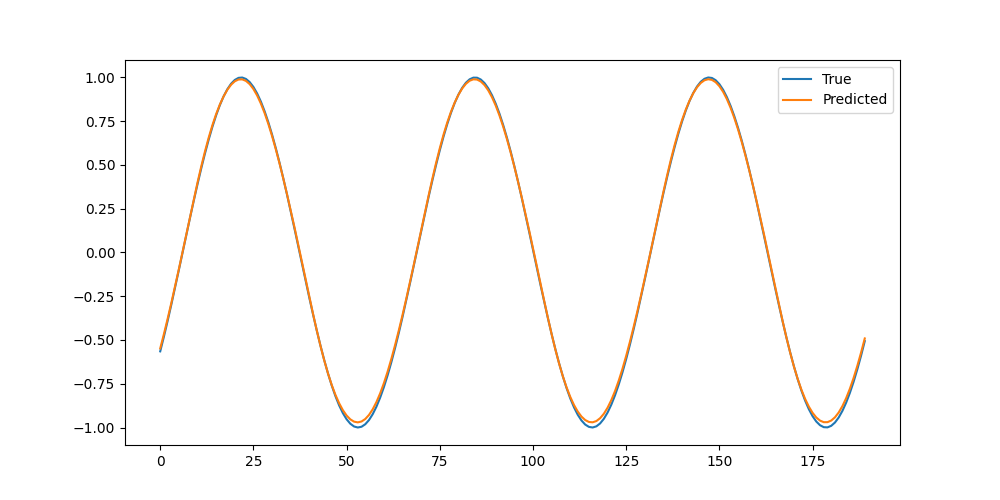
    plt.plot(y_test.numpy(), label='True')
    plt.plot(predictions.numpy(), label='Predicted')
    plt.legend()
    plt.savefig("m-3.png")

    return(0)

main()
- LSTMは、nn.LSTM()で簡単にモデルを作ることができる。
- LSTMは(バッチサイズ、シーケンス長、入力次元数)の形状を入力する必要があるため、unsqueez(-1)で次元を調整している。
- 出力ファイル1
CODE: n-1 (MediaPipe)
import cv2
import mediapipe as mp
from mediapipe.tasks import python
from mediapipe.tasks.python import vision

cv2.setNumThreads(0)
cv2.ocl.setUseOpenCL(False)


INPUT_PATH = "n-1_input.mp4"
OUTPUT_PATH = "n-1_output.mp4"
MODEL_PATH = "hand_landmarker.task"

def process_and_save_video(input_path, output_path, model_path):
    cap = cv2.VideoCapture(input_path)
    fps = int(cap.get(cv2.CAP_PROP_FPS))
    w = int(cap.get(cv2.CAP_PROP_FRAME_WIDTH))
    h = int(cap.get(cv2.CAP_PROP_FRAME_HEIGHT))
    fourcc = cv2.VideoWriter_fourcc(*'mp4v')
    out = cv2.VideoWriter(output_path, fourcc, fps, (w, h))

    base_options = python.BaseOptions(model_asset_path=model_path)
    options = vision.HandLandmarkerOptions(
        base_options=base_options,
        running_mode=vision.RunningMode.VIDEO,
        num_hands=2,
        min_hand_detection_confidence=0.5,
        min_hand_presence_confidence=0.5,
        min_tracking_confidence=0.5
    )

    with vision.HandLandmarker.create_from_options(options) as landmarker:
        while (cap.isOpened() ):
            success, frame = cap.read()
            if ( not success ):
                break

            mp_image = mp.Image(image_format=mp.ImageFormat.SRGB, data=frame)
            timestamp_ms = int(cap.get(cv2.CAP_PROP_POS_MSEC))

            result = landmarker.detect_for_video(mp_image, timestamp_ms)

            if ( result.hand_landmarks ):
                for landmarks in result.hand_landmarks:
                    for landmark in landmarks:
                        x = int(landmark.x * w)
                        y = int(landmark.y * h)
                        cv2.circle(frame, (x, y), 5, (0, 255, 0), -1)

            out.write(frame)

    cap.release()
    out.release()
    return


def main():
    process_and_save_video(INPUT_PATH, OUTPUT_PATH, MODEL_PATH)
    return(0)


if __name__ == "__main__":
    main()
CODE: p-1 (Flask)
import os
from flask import Flask, render_template

app = Flask(__name__)

@app.route('/')
def index():
    profile = {
        "name": "山田太郎",
        "role": "学生",
        "greeting": "よろしくお願いします!"
        }
    return(render_template("index.html", profile=profile))

if __name__=="__main__":
    app.run(debug=False)
- ディレクトリ構成が重要。以下のディレクトリ構成を守ること。
my_project/
├── app.py          (本ファイル)
├── templates/      (HTMLテンプレート)
│   └── index.html
└── static/         (CSS/画像)
    └── style.css
- index.html, style.cssをそれぞれ参照。【右クリック -> 名前を付けてリンク先を保存】
- Githubへのデプロイの方法はこちらを参照。
CODE: q-1 (OpenCV)
import os
os.environ['OMP_NUM_THREADS'] = '1'
os.environ['MKL_NUM_THREADS'] = '1'

import cv2


INPUT_FILE = "q-1_input.jpg"
OUTPUT_FILE = "q-1_output.jpg"


def process_image(input_path, output_path):
    img = cv2.imread(input_path)
    if ( img is None ):
        print("Error: 画像が読み込めません。")
        return

    # ---- グレースケール化 ----

    img = cv2.cvtColor(img, cv2.COLOR_BGR2GRAY)

    # ---- ガウシアンフィルタ (平滑化) ----

    img = cv2.GaussianBlur(img, (5, 5), 0)

    # ---- リサイズ ----

    h, w = img.shape[:2]
    img = cv2.resize(img, (w // 2, h // 2))

    # ---- フリップ ----

    img = cv2.flip(img, 1)

    cv2.imwrite(output_path, img)
    print(f"処理完了! {output_path}に保存しました。")
    return


def main():
    process_image(INPUT_FILE, OUTPUT_FILE)
    return(0)


main()


CODE: r-1 (Streamlit)
import streamlit as st

def main():
    st.set_page_config(page_title="はじめてのStreamlit")

    st.title("はじめてのStreamlit")

    name = st.text_input("あなたのお名前を教えてください")

    if ( st.button("実行する") ):
        st.write(f"こんにちは、{name}さん!")

    return(0)


if __name__ == "__main__":
    main()
- Streamlitは、簡単にWebサイトを作れるライブラリ。
- st.title()でタイトル設定、st.text_input()でテキストボックス作成、st.button()でボタン作成など...
- st.write()でページの書き換えを行う。
- 作成されたページで名前を入れてみて、"こんにちは、〇〇さん!"と表示されるかを確かめよう。
CODE: r-2 (Streamlit)
import streamlit as st

def main():
    title = "Streamlitでセレクトボックス!"
    st.set_page_config(page_title=title)

    st.title(title)
    fruits_list = ["りんご", "バナナ", "みかん", "いちご"]

    name = st.text_input("あなたのお名前を教えてください")
    selected_fruits = st.selectbox("好きな果物を教えて!", fruits_list)

    if ( st.button("実行する") ):
        st.write(f"こんにちは、{name}さん!")
        st.write(f"選択したフルーツ: {selected_fruits}")

    return(0)


if __name__ == "__main__":
    main()
- Streamlitではセレクトボックスやラジオボタンなど、Webサイトに必要な要素が一通り使える。
- セレクトボックスは"配列"を作成し、st.selectbox()で設定するだけ!
- st.selectbox()で取得した値は、選択された要素となる。
CODE: r-3 (Streamlit)
import streamlit as st

def show_page1():
    st.title("問い合わせフォーム")
    with st.form("contact_form"):
        name = st.text_input("お名前")
        message = st.text_input("内容")
        submitted = st.form_submit_button("送信")

        if ( submitted ):
            if ( name and message ):
                st.session_state.name = name
                st.session_state.message = message
                st.session_state.page = "page2"
                st.rerun()
            else:
                st.error("すべての項目に入力してください。")
    return


def show_page2():
    st.title("送信完了!")
    st.write("送信内容")
    name = st.session_state.get("name")
    message = st.session_state.get("message")
    st.write(f"名前: {name}")
    st.write(f"内容: {message}")

    if ( st.button("フォームに戻る") ):
        st.session_state.page = "page1"
        st.rerun()
    return


def main():
    st.set_page_config(page_title="問い合わせフォーム")

    if ( "page" not in st.session_state ):
        st.session_state.page = "page1"

    if ( st.session_state.page=="page1" ):
        show_page1()
    elif ( st.session_state.page=="page2" ):
        show_page2()

    return(0)


if __name__ == "__main__":
    main()
- 「一つの画面に一つの関数」という考え方を大事にしよう!
- どこからどの画面(関数)に遷移するのかをチェック!
- st.session_stateにて入力内容を保存する。
- st.rerun()でmain()がもう一度呼び出されるイメージ。main()で画面を振り分けている。
- st.form()の引数は空欄でなければなんでも良いが、他のフォームと違うものにしよう。
- 【注意】st.session_state.{xxx} のxxxの部分は何を入れてもよい。適当な変数名にしよう。
CODE: r-4 (Streamlit)
import streamlit as st

def show_tab1():
    st.subheader("ユーザープロフィール")
    name = st.text_input("表示名", value="山田 太郎")
    bio = st.text_area("自己紹介", placeholder="ここに自己紹介を書いてください")
    st.info("これらは公開プロフィールに表示されます。")
    return(name, bio)


def show_tab2(name, bio):
    st.subheader("現在の設定内容")
    st.write(f"**名前:** {name}")
    st.write(f"**紹介文:** {bio}")
    return


def main():
    st.title("マイページ設定")

    (tab1, tab2) = st.tabs(["基本情報", "プレビュー"])

    with tab1:
        (name, bio) = show_tab1()
    with tab2:
        show_tab2(name, bio)

    return(0)

if __name__ == "__main__":
    main()
- st.tabs()でタブ画面を簡単に実装できる。
- タブ画面も関数で管理するとわかりやすい。
- 画面について、「何の値を渡して」「何を取得するか」を考えて関数を作成しよう。
- タブ以外にも、横分割のst.columns()など様々な関数が実装されている。st.columns()はスマホ画面で見づらくなることがあるので、まずはタブ画面をマスターしよう。
CODE: r-5 (Streamlit)
import streamlit as st

def main():
    st.title("計算チャットボット")

    if ( "messages" not in st.session_state ):
        st.session_state.messages = []

    for message in st.session_state.messages:
        with st.chat_message(message["role"]):
            st.write(message["content"])

    prompt = st.chat_input("計算式を入力してください (例: 10 + 5)")

    if ( prompt ):
        st.session_state.messages.append({"role": "user", "content": prompt})
        with st.chat_message("user"):
            st.write(prompt)

        try:
            result = eval(prompt)
            response = f"計算結果は {result} です。"
        except Exception:
            response = "計算できませんでした。正しい数式を入力してください。"

        with st.chat_message("assistant"):
            st.write(response)

        st.session_state.messages.append({"role": "assistant", "content": response})

    return(0)


if __name__ == "__main__":
    main()
- st.chat_message(), st.chat_input()の2つだけで、チャットボットの画面を作成することができる。
- try - exceptにて、例外処理を行っている。Pythonでの「例外処理」の基本
- st.session_state.messagesにメッセージのやりとりを保存しておき、最初に表示する。
- st.chat_message()でroleを入力し、st.write()でメッセージの内容を出力。
- roleは"user"と"assistant"の他に"system"や、ユーザで設定したものを使用することもできる。
- eval()は文字列で与えられた式を実行する組み込み関数。ここの部分を自作のものに変えることで、好きなチャットボットを作ることができる。
CODE: s-1 (辞書)
def main():
    user_dict = {
            "name": "Alice",
            "age": 25,
            "city": "Tokyo"
            }

    # 値の取得
    print(user_dict["name"])

    # 要素の追加
    user_dict["job"] = "Teacher"

    # 要素の更新
    user_dict["age"] = 28

    # 要素の削除
    del user_dict["job"]

    # キーの取り出し
    for key in user_dict.keys():
        print(key)

    # 値の取り出し
    for value in user_dict.values():
        print(value)

    return(0)


main()
- 値の取得、追加、更新、削除をまずは覚えよう。
- キーや値の取り出しはforループを使おう。
CODE: s-2 (辞書)
def calc_total(cart_dict):
    price_dict = {
            "りんご": 150,
            "バナナ": 100,
            "みかん": 80
            }

    total = 0

    for key in cart_dict.keys():
        total += price_dict[key] * cart_dict[key]

    return(total)


def main():
    my_cart = {
            "りんご": 5,
            "バナナ": 2
            }

    total_price = calc_total(my_cart)
    print(f"合計: {total_price} 円")

    return(0)


main()
初心者から始められるPythonレッスン

● プログラミング未経験者・初心者歓迎!
● 月額4,000円で質問し放題!!
● 完全オンライン
● 翌日までには必ず返信
● 挫折しない独自の学習メソッド
● 圧倒的高評価!!
● テキストベースで時間を選ばない
● 4,000円/60分の伴走型ビデオチャット指導も可能
● 高品質なサンプルコード
詳細はこちら
● 月額4,000円で質問し放題!!
● 完全オンライン
● 翌日までには必ず返信
● 挫折しない独自の学習メソッド
● 圧倒的高評価!!
● テキストベースで時間を選ばない
● 4,000円/60分の伴走型ビデオチャット指導も可能
● 高品質なサンプルコード
詳細はこちら